Modempay Payment
Modempay is now integrated as a native payment gateway, supporting wallets, cards, and bank transfers. Please note that this gateway currently supports GMD (Gambian Dalasi) only.
Follow these simple steps to enable this feature:
Step 1: Install the WooCommerce Plugin
Before configuring FluxBuilder, you must prepare your website.
Download and install the Modempay plugin for WooCommerce from the official documentation: https://docs.modempay.com/plugins/woocommerce
Activate the plugin and ensure your store currency is set to GMD.
Step 2: Obtain Your API Keys
To connect your app to the payment gateway, you will need your specific merchant keys.
Log in to your Modempay Merchant Dashboard.
Navigate to the Developer section or go directly to: merchant.modempay.com/developers.
Copy your Public Key and Secret Key.
Step 3: Configuration
Now, you need to add these credentials to your app's configuration file.
- Open your app on FluxBuilder.
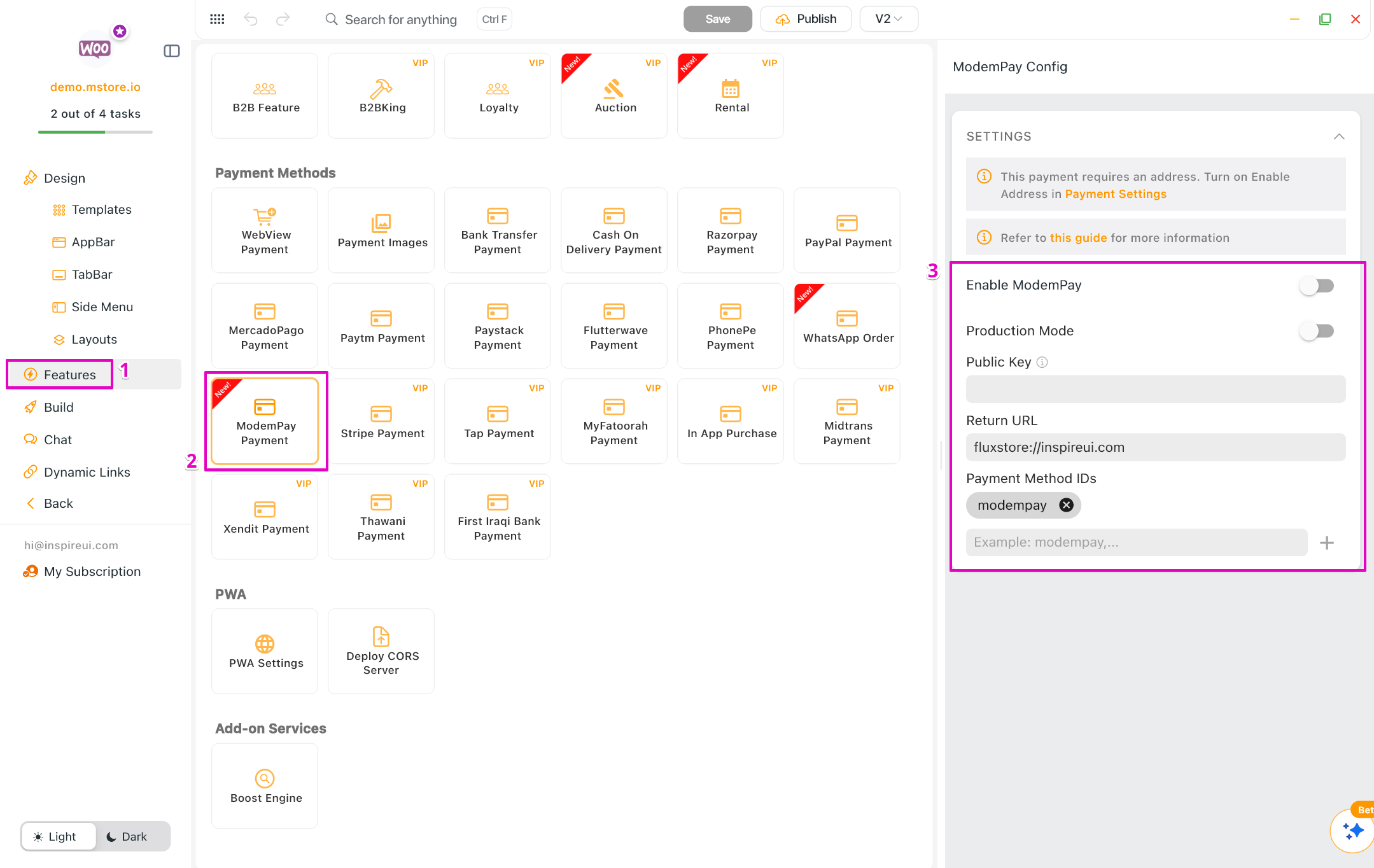
- Go to Features. In Payment Methods, open ModemPay Payment.
- Enable ModemPay.
- Turn on Production Mode to exit the test mode on app.
- Input Public Key, Return URL, and Payment Method IDs.