Universal Links / App Links
Enable Self-Hosted Share Links to provide a seamless experience. This feature supports iOS Universal Links and Android App Links — users tapping your website URLs (product, category, blog, etc.) on their phone will open it directly in the app and navigate to the corresponding screen. Otherwise, the link will open in the browser.
1. Enable the Feature
Follow these simple steps to enable this feature:
- Create your app on FluxBuilder.
- Go to Features > in General, open Dynamic Link Config
- In the Dynamic Link Service, select “Self Hosted”
- Enter data.
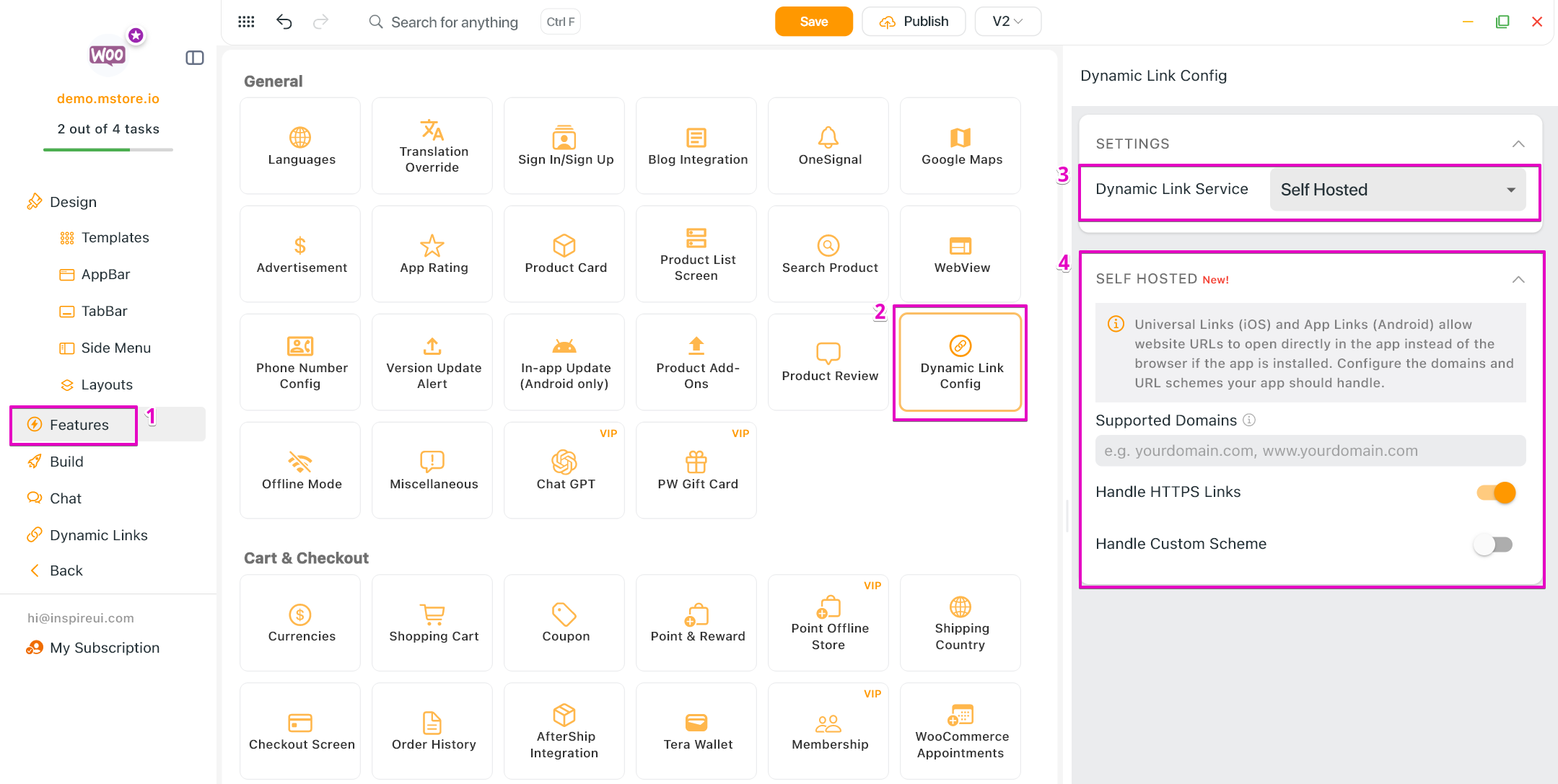
2. Setup for iOS and Android
- iOS setup: upload the file
apple-app-site-association(without.jsonextension at the end) to your website in the .well-known/ folder. For example: https://demo.mstore.io/.well-known/apple-app-site-association. The response header must returnContent-Type: application/json
{
    "applinks": {
        "apps": [],
        "details": [
            {
                "appIDs": [
                    "<Apple Team ID>.<iOs Bundle ID>" // For example: "S9RPAM8224.com.inspireui.mstore.flutter"
                ],
                "paths": [
                    "/product/*",
                    "/products/*",
                    "/shop/*",
                    "/product-category/*",
                    "/collections/*",
                    "/brand/*",
                    "/product-tag/*",
                    "/store/*",
                    "/listing/*",
                    "/blog/*",
                    "/post/*"
                    // If you want to handle more paths, put them here
                ]
            }
        ]
    }
}
- Android setup: upload the file
assetlinks.json(with .json extension at the end) to your website in the .well-known/ folder. For example: https://demo.mstore.io/.well-known/assetlinks.json. The response header must returnContent-Type: application/json
[
    {
        "relation": [
            "delegate_permission/common.handle_all_urls"
        ],
        "target": {
            "namespace": "android_app",
            "package_name": "<Android package name>", // For example: "com.inspireui.fluxstore"
            "sha256_cert_fingerprints": [
                "<SHA 256 key>" // For example: "5B:67:14:C9:6E:A5:59:C4:00:22:77:46:49:ED:E3:45:B3:B1:21:38:9F:D1:1E:CC:FB:8E:33:4D:46:70:F0:DD",
            ]
        }
    }
]
- If you want to handle more paths, put them here (at the end, before </intent-filter> tag)
<!-- ================= WEBSITE APP LINKS (ALLOWLIST PATH) ================= -->
<intent-filter android:autoVerify="true">
    <action android:name="android.intent.action.VIEW" />
    <category android:name="android.intent.category.DEFAULT" />
    <category android:name="android.intent.category.BROWSABLE" />

    <data android:scheme="https" android:host="${websiteDomain}" android:pathPrefix="/product/" />
    <data android:scheme="https" android:host="${websiteDomain}" android:pathPrefix="/products/" />
    <data android:scheme="https" android:host="${websiteDomain}" android:pathPrefix="/shop/" />
    <data android:scheme="https" android:host="${websiteDomain}" android:pathPrefix="/product-category/" />
    <data android:scheme="https" android:host="${websiteDomain}" android:pathPrefix="/collections/" />
    <data android:scheme="https" android:host="${websiteDomain}" android:pathPrefix="/brand/" />
    <data android:scheme="https" android:host="${websiteDomain}" android:pathPrefix="/product-tag/" />
    <data android:scheme="https" android:host="${websiteDomain}" android:pathPrefix="/store/" />
    <data android:scheme="https" android:host="${websiteDomain}" android:pathPrefix="/listing/" />
    <data android:scheme="https" android:host="${websiteDomain}" android:pathPrefix="/blog/" />
    <data android:scheme="https" android:host="${websiteDomain}" android:pathPrefix="/post/" />
    <!-- Add your custom paths here -->
</intent-filter>
- Supported deep link paths:
/product/*,/product-category/*,/collections/*,/brand/*,/product-tag/*,/store/*,/listing/*,/blog/*,/post/*